Quick Facts
Client: Singapore Prison Service (SPS)
Platform: Tablet App
Duration: 3 weeks (Feb 2023)
Team Size: 4 pax
#TabletApp
#eLearning
#Gamification
Project Overview
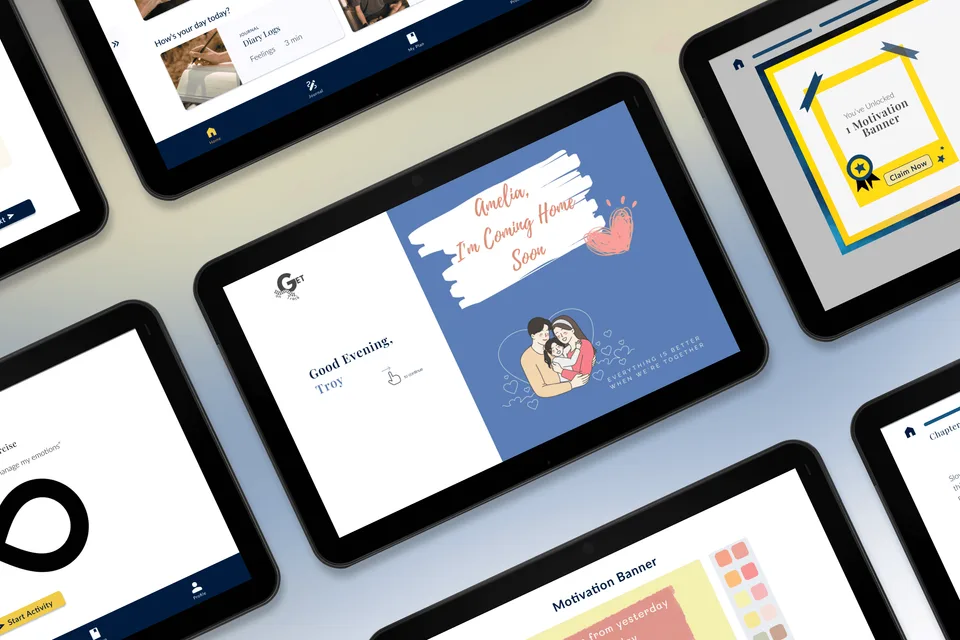
In a team of four, we utilised the Octalysis framework to gamify learning and create an eLearning tablet app. Backed with inmate user research and paper prototyping, this informed the digitalising of a Self-Help Booklet (SHB), aimed at enhancing inmates’ personal development.
More Info:
What is SPS?
The Singapore Prison Service (SPS) is an organisation focused on managing and rehabilitating offenders in Singapore. This project aims to digitalise the existing self-help booklet into an interactive e-learning tablet app. Lastly, strengthen inmates' risk assessment plans before their release by leveraging gamification techniques to stimulate intrinsic motivation and foster continuous improvement.
What are the Objectives?
- Digitalize the existing self-help booklet into an e-learning tablet app. - Develop an engaging app with gamification elements to strengthen inmates' risk assessment plan before release. - Ensure visually engaging, informative content aligned with the learning goals of inmates with different personas. - Develop gamification elements using the Octalysis - Framework for intrinsic motivation. - Measure the effectiveness and engagement of inmates using the app to strengthen their risk assessment plans through paper prototype.
VIEW PROTOTYPE
What Challenges did we face?
Information Architecture (IA)
As we awaited clearance to visit the prison, our team gathered to work on the book activity. We delved into each narrative, analyzed the content flow, and assessed the book's structure. With the objective of digitizing the Self-Help Book (SHB) into an e-learning app, our aim is to reorganize the activities into different pathways. This will enable users to skip irrelevant chapters and group activities based on reflection points, ultimately fulfilling the intended purpose of the SHB—to complete their personalised 'Stay Safe' Plan (SSP).
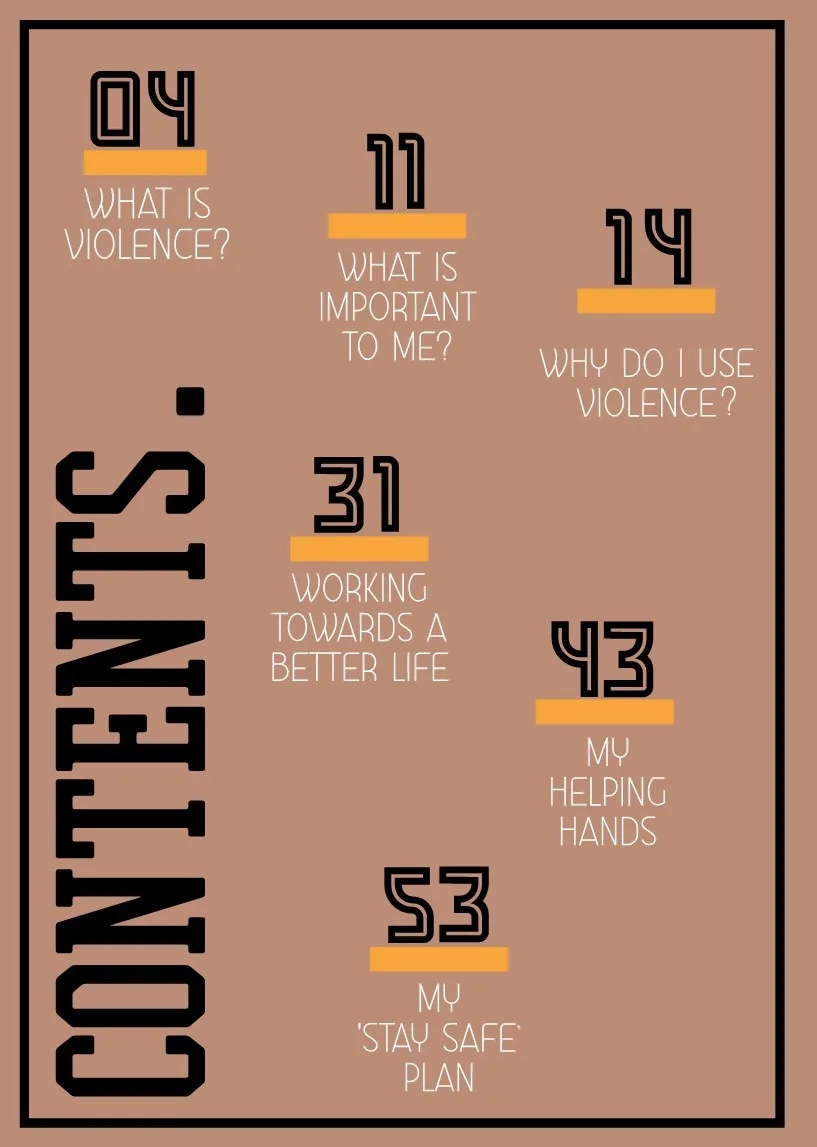
Content of Self Help Booklet (SHB)
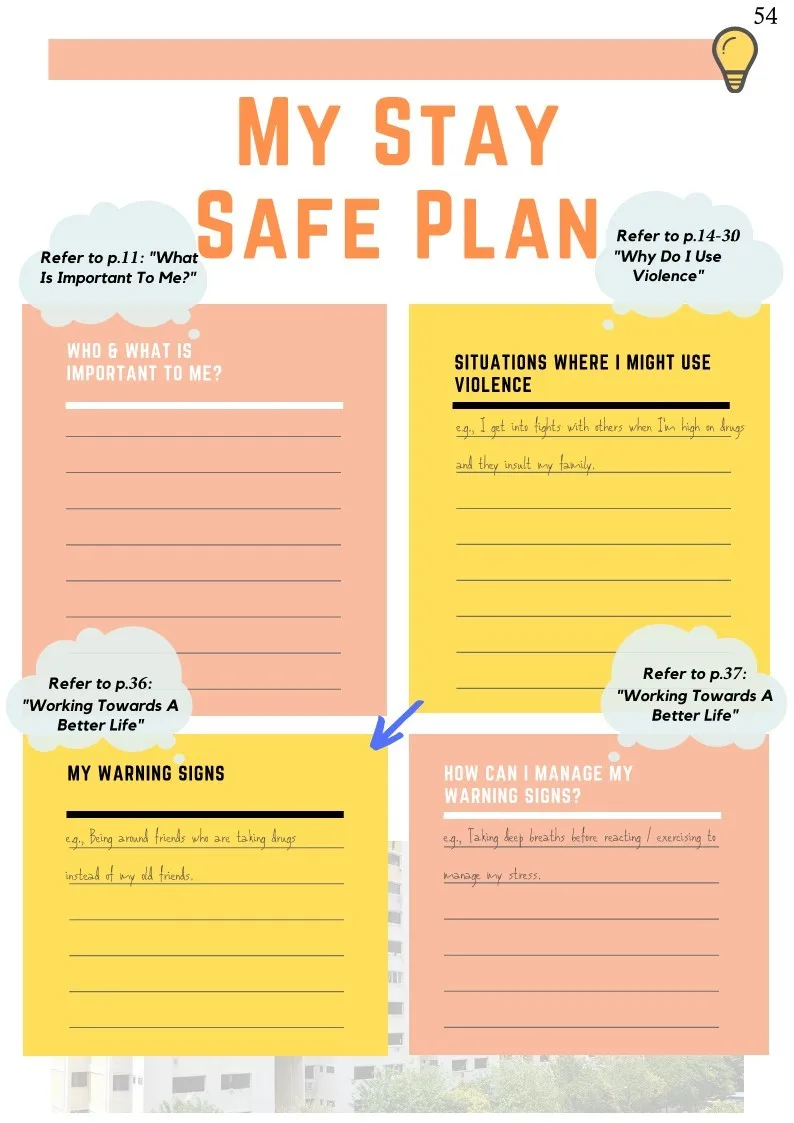
Stay Safe Plan (SSP) Page 1
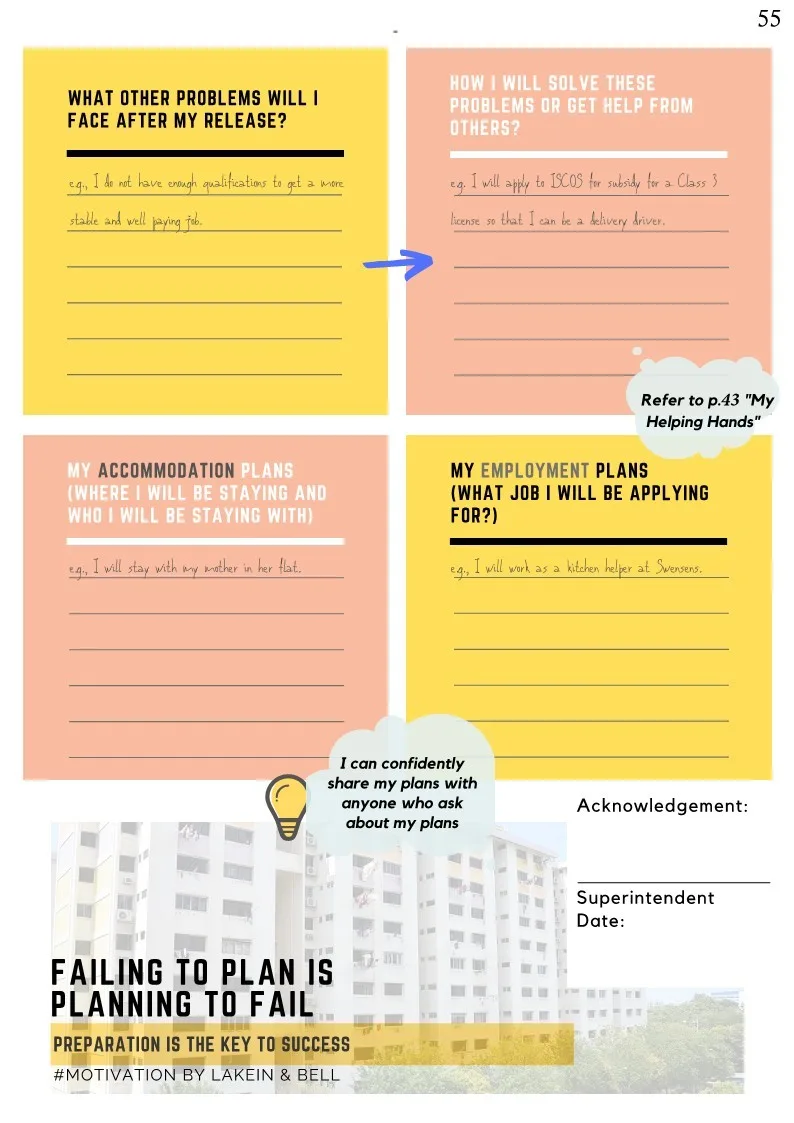
Stay Safe Plan (SSP) Page 2
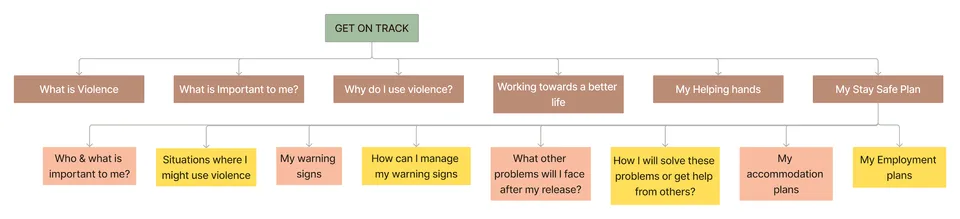
SHB IA & breakdown of SSP
(Unique) User Interview
Conducting interviews with inmates provides a unique experience, but it is important to consider various factors that can impact the quality of the results.
Reliable Pen & Paper: Due to restrictions on bringing electronic devices, we relied on pen and paper to transcribe the inmates' remarks and insights during the interview, spending a significant amount of time on this task.
Time Constraints: Each interviewee was limited to a 30-minute duration, and while the process of visiting the prison went smoothly, we faced challenges in contacting the Control Unit for clarification due to the lack of a mobile device, resulting in additional trips around the building.
Challenging Atmosphere: Some inmates displayed discomfort during the interviews, with one suspecting that we were re-assessing their crimes to potentially reduce charges. In other cases, inmates showed disinterest or perceived no benefit from the interview. Despite our efforts to introduce ourselves and clarify our intentions, we recognized that these factors may have affected the overall quality of the interviews.
Our Findings & Problem
Research Insights
We conducted 9 user interviews (on-site) and 1 ex-offender interview (phone call).
These are our top 5 key insights:
"I want to hear stories of ex-offenders turning their lives around"
"I don't feel safe writing personal things on Self Help Booklet (SHB)"
"I see my family as a source of motivation"
"I need to have multiple language options or help"
"I find content in the tablet to be interesting if there is audio"
Comparative Analysis
"Are there any existing best-in-class apps?"
Thus we looked into various categories of apps e.g. eLearning, Cognitive Behaviour Therapy (CBT), Mindfulness, Children eLearning, etc to understand what is done well and what we could learn from them.
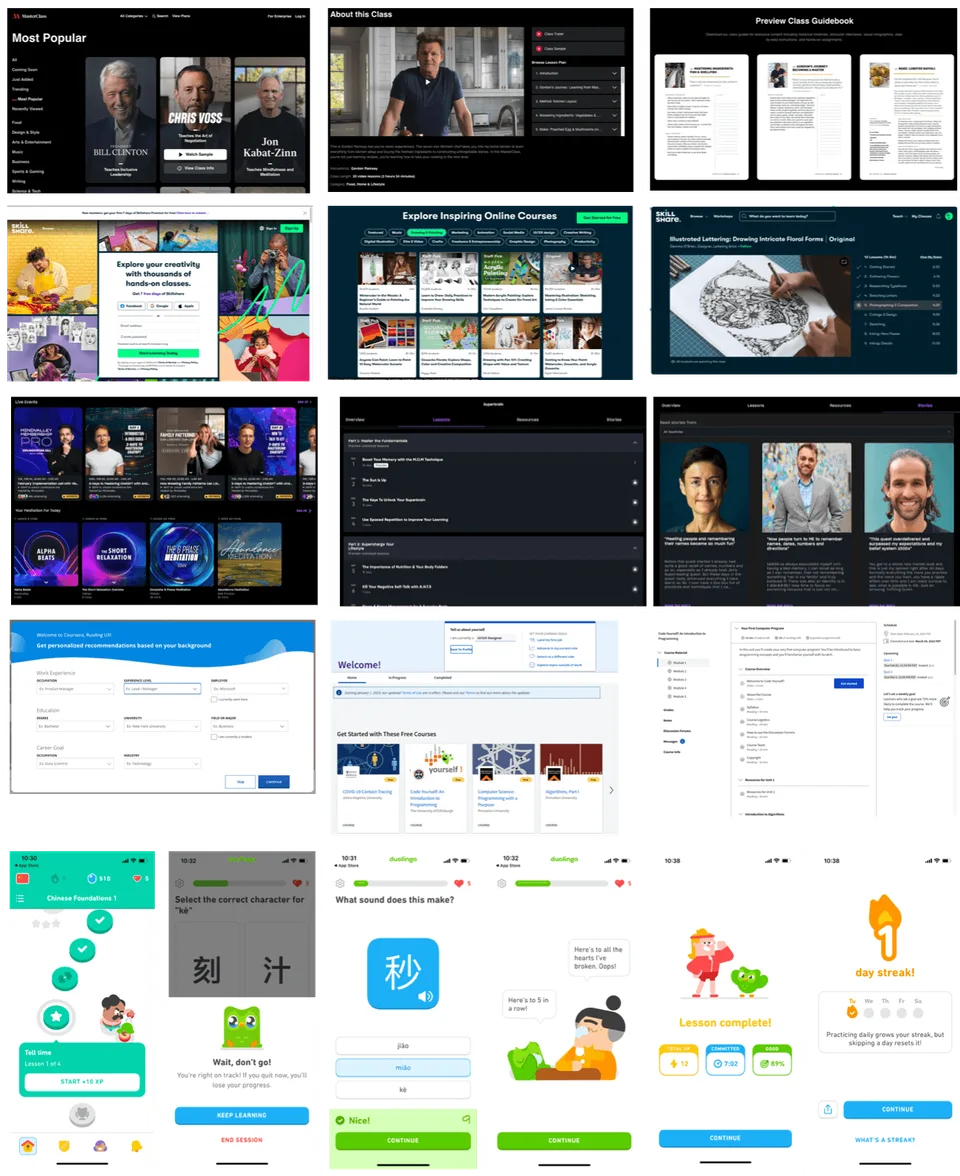
Screenshots of
Masterclass, Skillshare, MindValley, Coursera, Duolingo
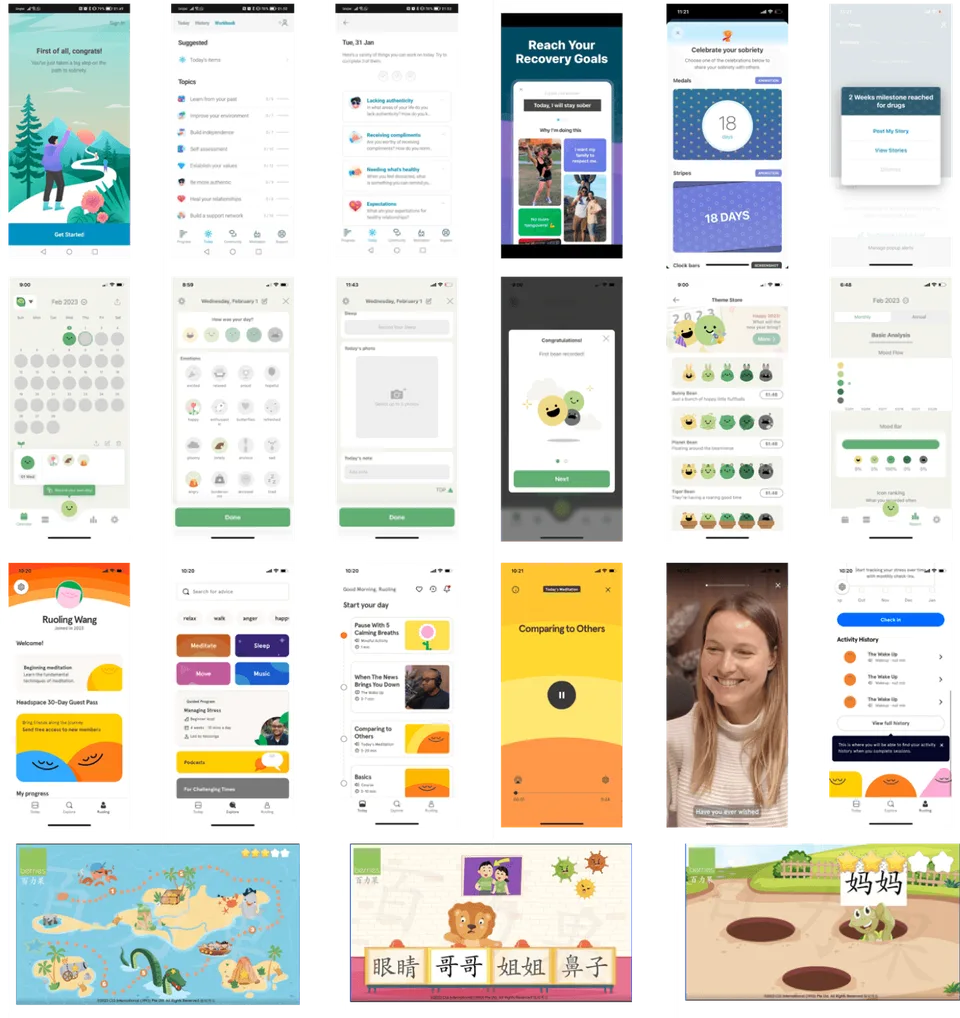
Screenshots of
I Am Sober, Daily Bean, Headspace, Berries,
Key Takeaways:
eLearning
- The use of real-life photos on the homepage appeals more to adult learners (as validated in our user interviews) - Having role models or hearing stories about people helps motivate learners to make a change in their lives - Indicating the time required to complete each activity is useful for users to decide whether to select each activity - Having bite-sized content - less than 10 minutes may lower the barrier for a user to try out an activity - Display progress-tracking to give user an idea of their progress and how much further they need to go - Encourage user to proceed with X number of tasks so that user can build habit of taking the course daily - Display content visually with illustrations or pictures and reduce text on the app - Tone-of-voice: use words that reinforces positive mindsets - Use of quizzes and reflections in order to help users retain information on the lessons that they have gone through
CBT / Mindfulness
- Ownership: Empowers user to own and remind himself of the goal. - Picture & Quotes remind users of motivations for committing to their recovery goal (e.g. family). - Journaling tool which allows user to record their feelings and reflections for the day. - Monthly overview of emoticons helps user to view their progress - Audio function enable users to listen to the lesson content
Children eLearning
- Interactive feedback to inform user of right or wrong answer - Instructions are read out on the app, without any written instructions. - Uses a visual map to inform user of their progress through the session
Problem Statement

HMW guide and motivate Troy to complete the Stay Safe Plan (SSP)?

HMW help Ismail to understand the content in the Self Help Booklet (SHB)?
What solutions do we proposed?
Solutions
After considering various ideas, we have chose four key features to address the mentioned HMW problems:
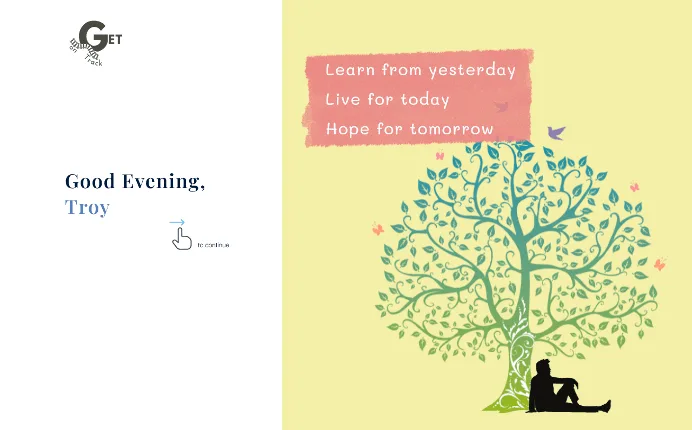
1. Motivation Banner
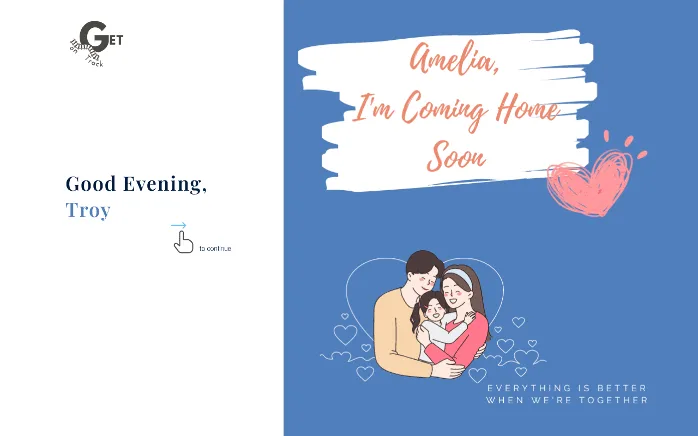
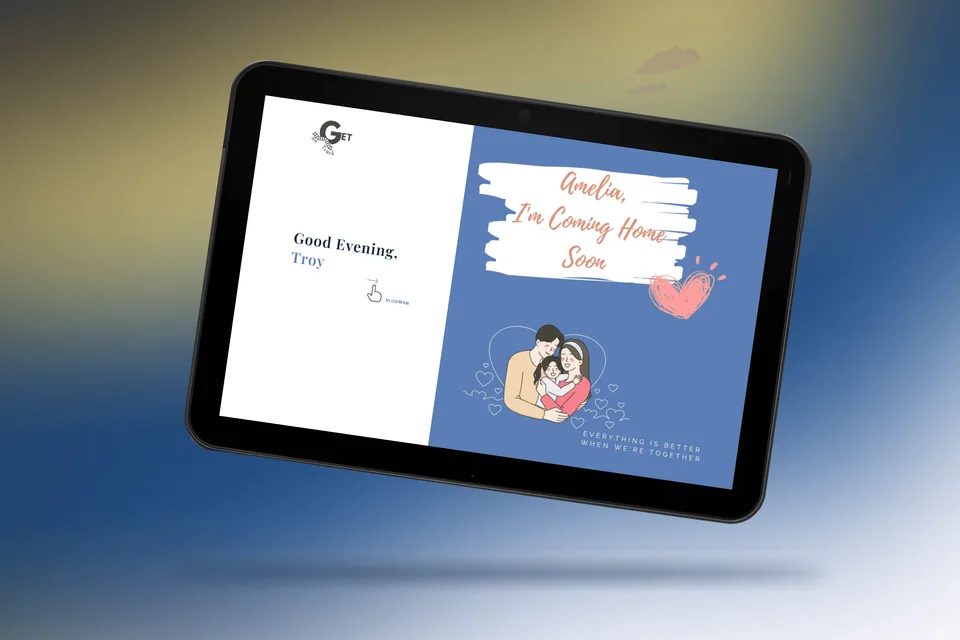
(Two Pic Above) Personalised Banner on their cover page
We wanted to help users to reflect on their journey and stay motivated when facing challenges. To achieve this, we've included a motivational banner feature that allows users to create their own personalised banner, reminding them of their determination to complete the program and achieve their goals.
2. Journailing
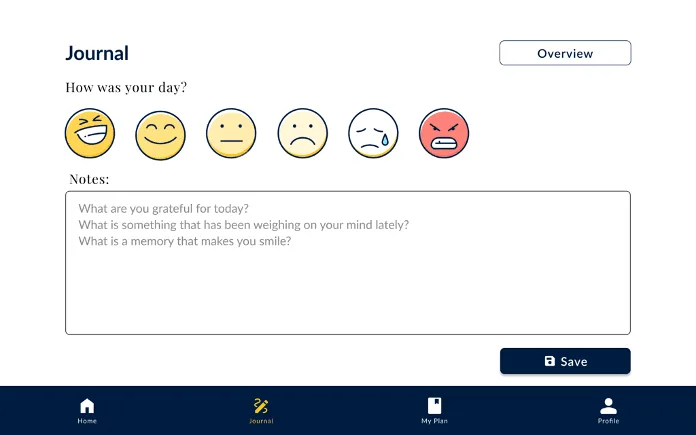
(Two Pic Above) Interface of Journal Page
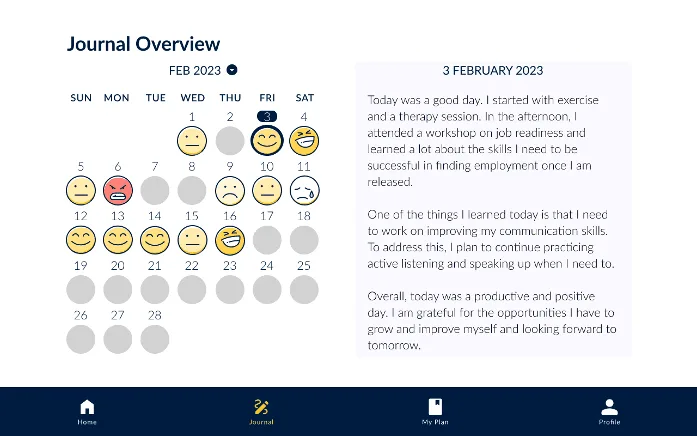
By providing a journaling feature in the app, users can have a private and secure space to write down their thoughts and feelings without the fear of being read by others. The app can provide a safe and confidential way for users to express themselves, which can improve their mental and emotional well-being.
Additionally, the journaling feature in the app can allow users to reflect on their progress, set goals, and track their personal growth. The app can provide prompts for writing, such as reflection on their behaviour, emotional state or progress on their rehabilitation, which can help guide their writing and encourage self-reflection.
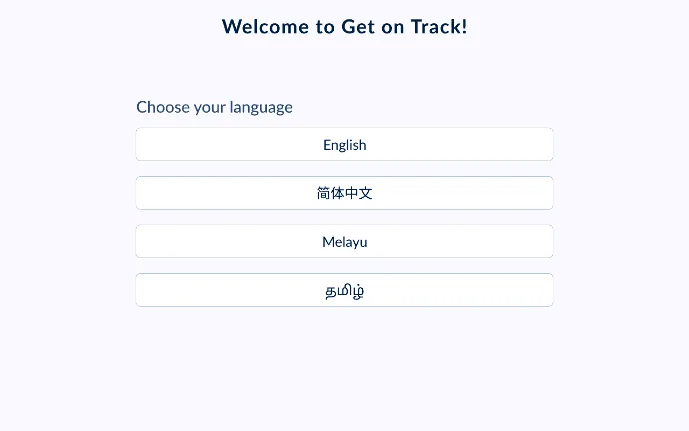
3. Text-to-Audio & Multiple Language
(Above) Text-to-Audio button on activity page
(Above) Multiple Language settings found on onboarding page
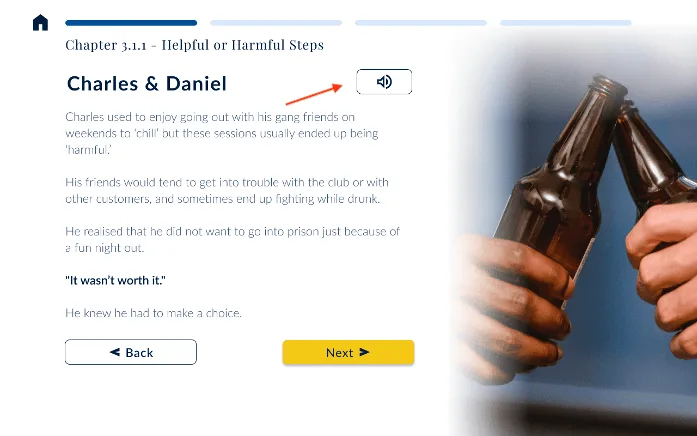
We have enhanced the app by introducing text-to-audio features that will audibly articulate the content displayed on the screen. This addition aims to improve user comprehension and engagement with the material. Furthermore, we have included language settings for four languages - English, Mandarin, Malay, and Tamil - to cater to non-English speaking users. These language options ensure accessibility and inclusivity for a wider range of users.
We use Yu Kai Chou Octalysis Framework to introduce gamification to the eLearning tablet application.
Based on our prototype designs, here are some examples of gamification applications.
4. Gamification Applications
a. Cover Page
Core Drive: Ownership Offering users a dedicated space to personalise the cover page in the app to their own motivation.
ge
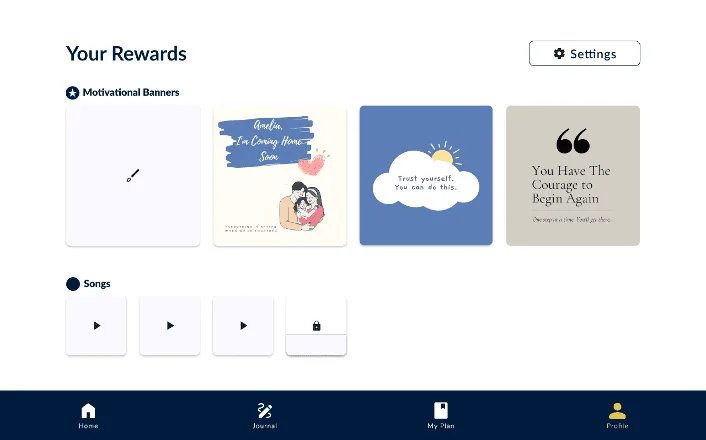
b. Profile Page
Core Drive: Ownership By providing a collection to store virtual goods like Motivation Banner & Songs, users feel a sense of ownership upon completing certain goals in their learning journey.
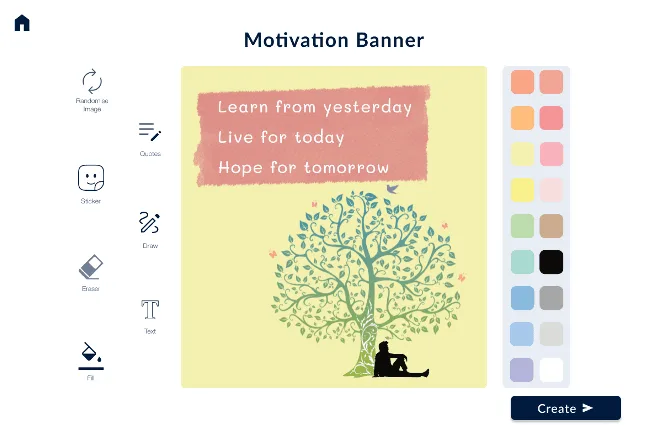
c. Motivation Banner Page
Core Drive: Empowerment Encouraging them to be creative and try different combinations to draw a banner for their cover page, targeting the feeling of empowerment.
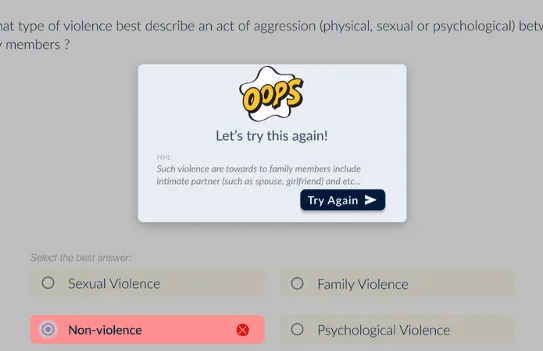
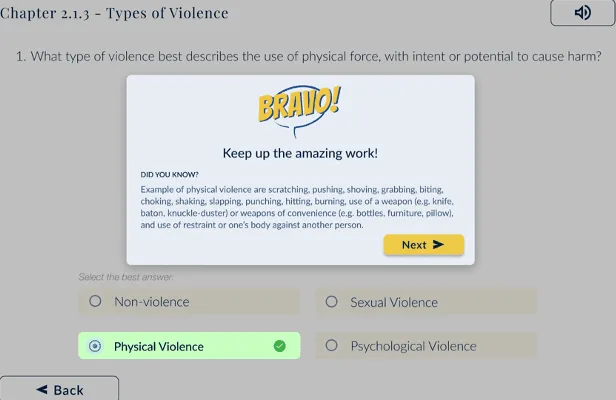
d. Question Overlay Page
Core Drive: Accomplishment & Empowerment Enabling users with interactive feedback upon answering the questions, giving users an idea if they answered it correctly.
e. Streaks Overlay
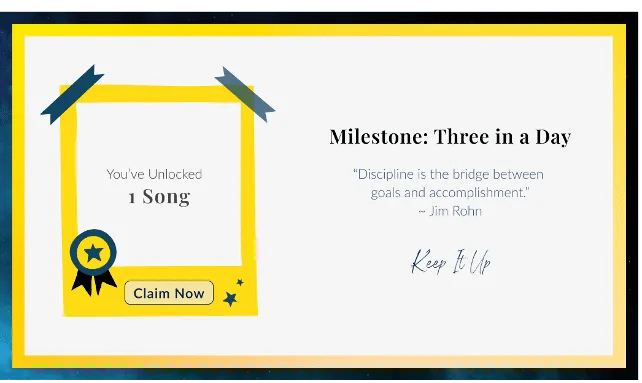
Core drive: Empowerment Upon logging 3 times a day, users are rewarded with a song, a feedback that motivates them to continue doing a certain action.
f. Rewards Overlay
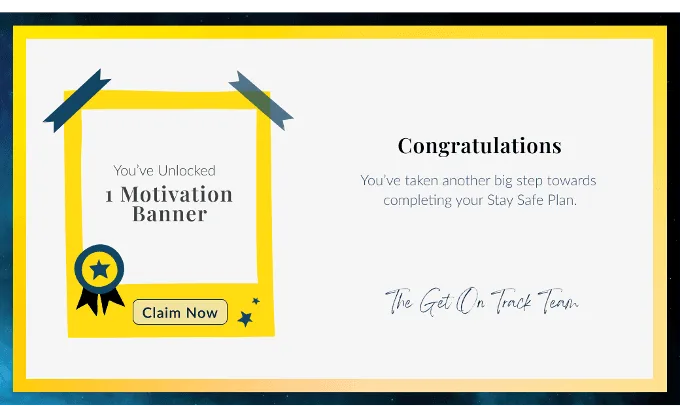
Core Drive: Accomplishment Completing a SSP reflection rewards users with a Motivation Banner, demonstrating progress and encouraging continued engagement.
In-depth explanation:
What is Yu Kai Chou Octalysis framework?
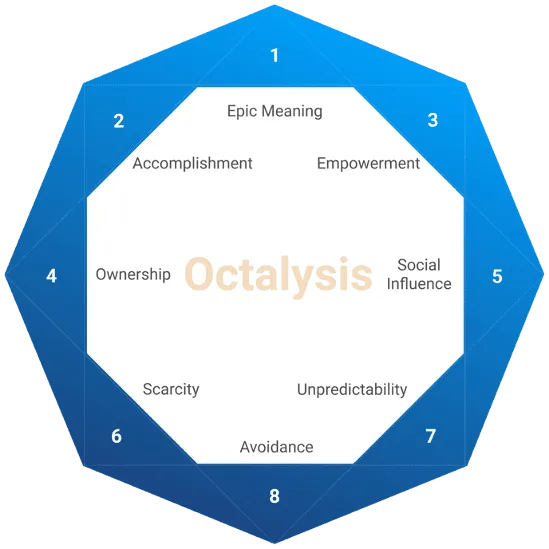
(Above) Yu Kai Chou Octalysis Framework
Gamification is the process of integrating the fun and engaging elements of games into non-gaming activities, such as e-learning, to make them more enjoyable and stimulating. Yu-kai Chou's Octalysis framework specifies eight core drives that motivate individuals to complete certain activities.
What are the 8 Core Drives?
The eight core drives are: 1. Epic Meaning & Calling - the drive to be part of something bigger than oneself and to have a sense of purpose. 2. Development & Accomplishment - the drive to improve skills, overcome challenges, and achieve success. 3. Empowerment of Creativity & Feedback - the drive to create and to see the impact of one's work, as well as to receive feedback. 4. Ownership & Possession - the drive to possess and to control things, and to feel a sense of ownership over them. 5. Social Influence & Relatedness - the drive to connect with others, to feel a sense of belonging, and to influence and be influenced by others. 6. Scarcity & Impatience - the drive to acquire something that is perceived as rare or in short supply, and to want it immediately. 7. Unpredictability & Curiosity - the drive to explore and to discover new things, and to be challenged by the unexpected. 8. Loss & Avoidance - the drive to avoid negative consequences, to minimise loss, and to protect what one has.
When these core drives are properly integrated into e-learning, they have the potential to make learning more engaging and enjoyable. By leveraging game mechanics, e-learning can provide an immersive experience that keeps learners motivated and engaged, leading to a more effective learning experience.
Types of Motivators
(Above) Areas of Motivators
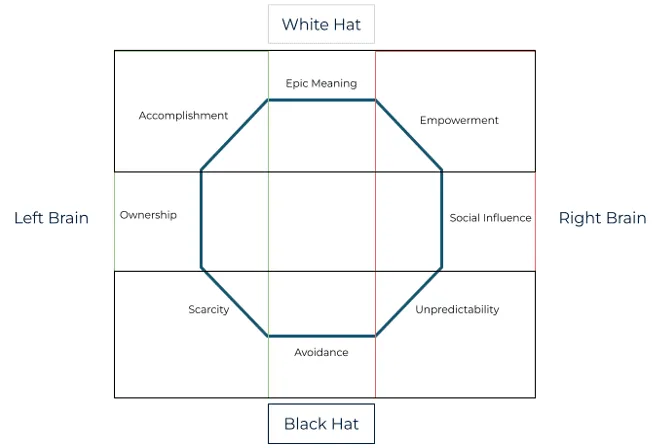
Gamification is the art of applying game mechanics to non-game contexts to engage and motivate people to complete certain activities. To do this effectively, we need to understand the Octalysis framework, which consists of four areas: left-brain motivators, right-brain motivators, white-hat motivators, and black-hat motivators.
- Left-brain region is mainly driven by extrinsic motivators such as logic, calculations, ownership, goal-setting, and rewards. - Right-brain region is mainly driven by intrinsic motivators such as creativity, self-expression, and social interaction. - White-hat motivators are geared towards positive and constructive techniques that create fun, challenging, and rewarding experiences. - Black-hat motivators are aimed at negative and manipulative techniques that exploit users' weaknesses, create artificial scarcity, and trigger a sense of urgency or fear.
Why were only 3 Core Drives chosen?
(Above) Selected Core Drives
By understanding these motivators, we identified the core drives that will be applicable to our eLearning app and design a gamification strategy that will maximises engagement and motivation.
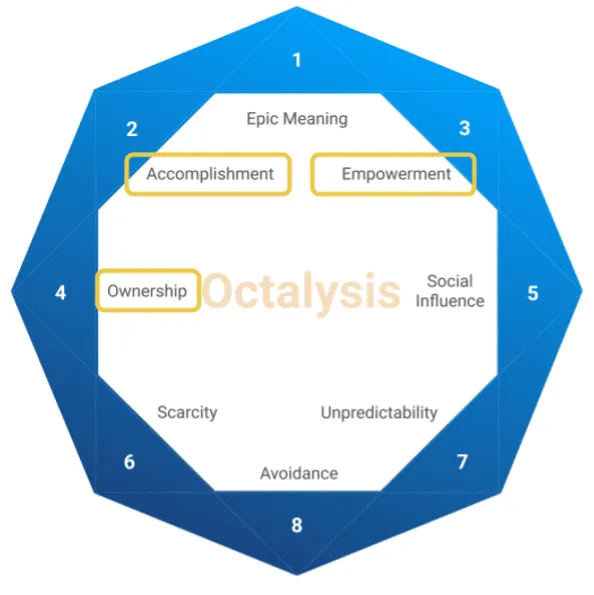
The three core drives to focus are:
1. Accomplishment
This motivator is under the extrinsic and white hat motivators category. Users will feel motivated when they make progress by completing lessons or activities, and get rewarded for answering questions correctly. For example, a progress bar to show learners their progress and encourage them to complete more lessons. For instance, each time a learner completes a lesson or activity, they are rewarded with something. The progress bar gives learners an idea of how much they have left to complete, helping them to stay motivated and engaged with the e-learning content.
2. Ownership
This motivator also falls under the extrinsic and white hat category. People feel more motivated when they own something. For example, they could have virtual badges or collections of music within the app when they completed certain milestones or specific goals in their learning journey. These virtual rewards can provide users with a sense of ownership and accomplishment, as well as a visual representation of their progress within the app.
3. Empowerment
This motivator falls under the intrinsic and white hat category, and includes creativity and feedback. By engaging users in a creative process where they have to figure things out and try different combinations, they will feel a strong sense of empowerment. For instance, providing a motivation banner to encourage them to be creative and draw a banner for their cover page can help to enhance this feeling of empowerment
By implementing these features, we aim to address the identified HMW problems and enhance the overall functionality and user experience of the app.
Proposed IA
As we transition from a physical booklet to a digital tablet platform, we had to develop a new framework for the proposed Information Architecture.
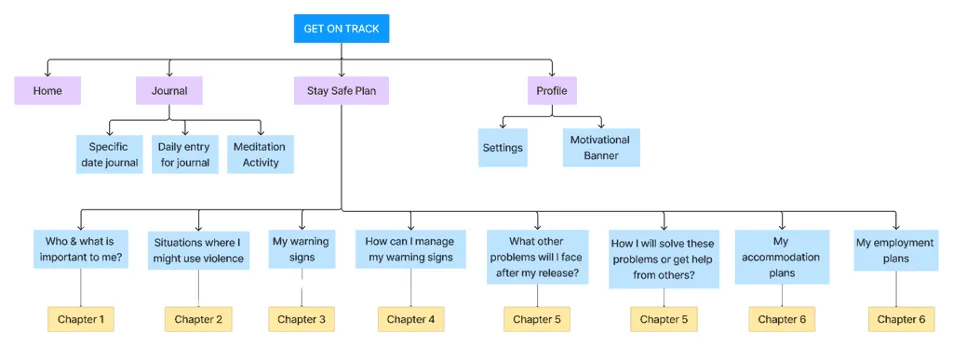
Proposed Information Architecture
More Info:
Rationale behind the proposed IA
(above) Current IA
(above) Proposed IA with Stay Safe Plan(SSP) only
Quick Recap: the current IA consist of 6 chapters and 8 sections of the SSP. After learning techniques from other eLearning apps, we want to structure the digital content in a way that is bite size learning for users to learn.
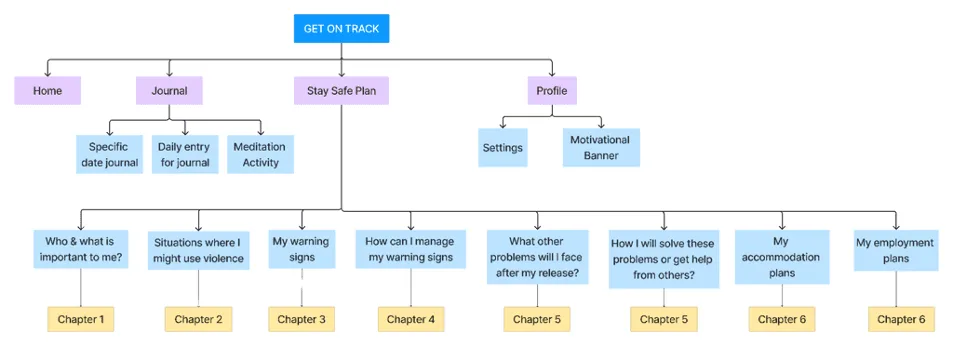
Establish framework & deriving Nav Bar
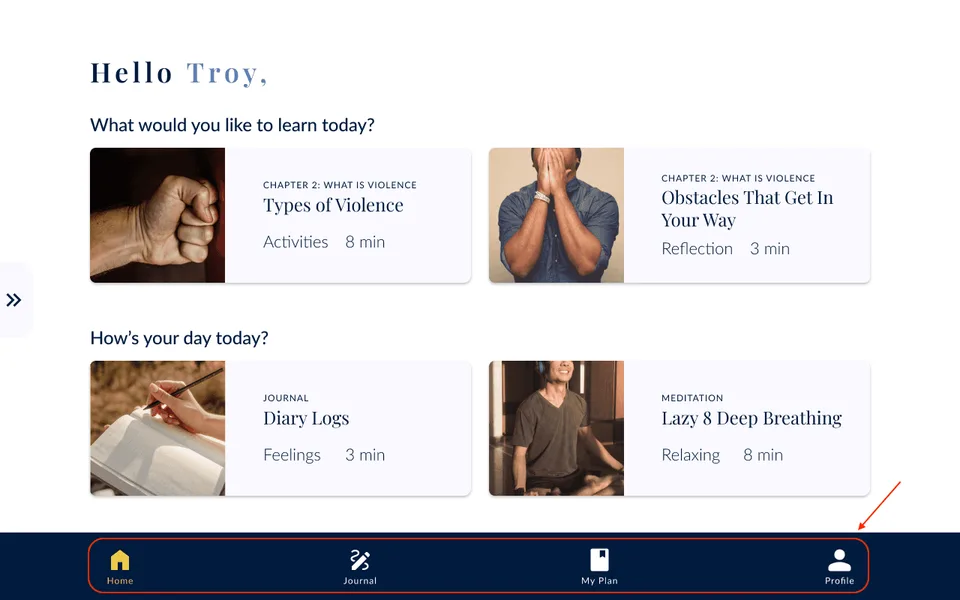
(above) Nav Bar selection
(above) Implementing Nav Bar in the design
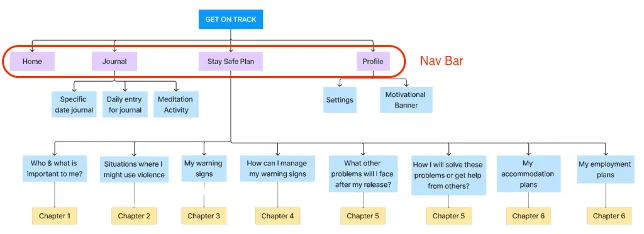
While developing our prototype, it is crucial to prioritise the inmates' completion of the Stay Safe Plan (SSP). Apart from the content of the Self Help Booklet (SHB), we need to establish the framework for our Minimum Viable Product (MVP). This will serve as the overall navigation structure for the tablet app and assist us in determining the appropriate placement of relevant content during the digitalisation of the SHB. Therefore, we have chosen Home, Journal, SSP, and Profile as the four primary tabs in our Navigation Bar.
Key Contribution
While my teammates were heavily invested in digitalising the content and incorporating numerous features, I played a significant role in redirecting their attention towards establishing a solid foundation for the tablet app structure and prioritising the development of the Minimum Viable Product (MVP). My focus was on ensuring clear content navigation and minimising ambiguity on each page for the user.
Prototype Development
Prototype
Using Figma, we created an interactive prototype that will be used to showcase our proposed design.
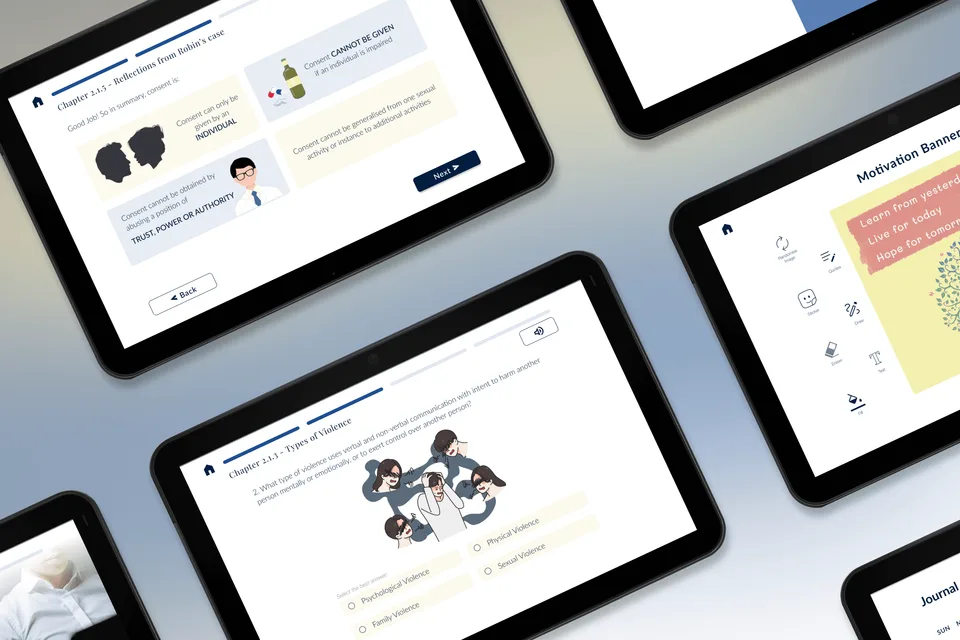
Activity Page
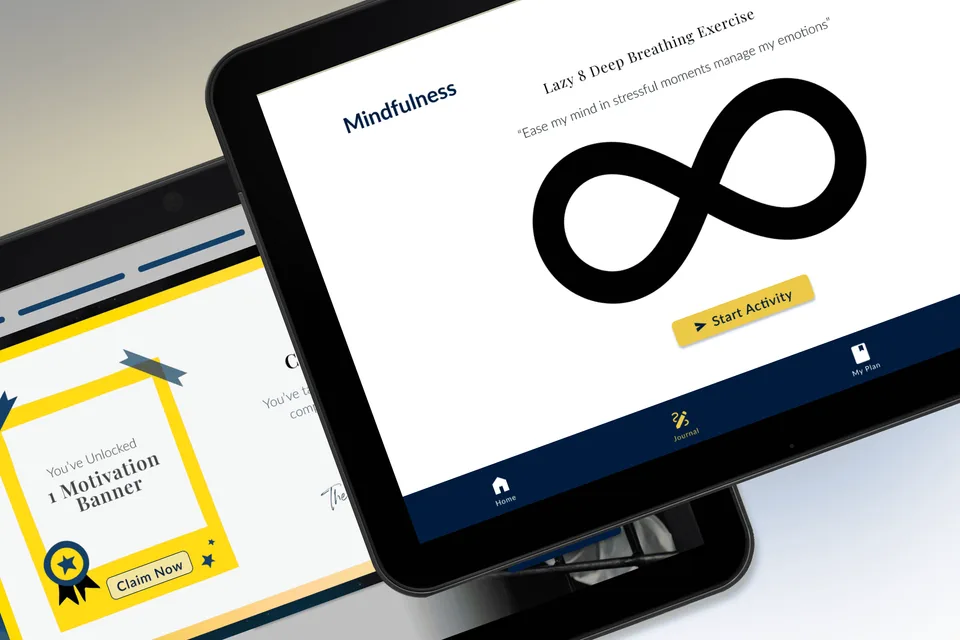
Motivation Overlay & Mindfulness Page
VIEW PROTOTYPE
(Unique) Usability Testing
It was difficult to make conclusions from this round of user testing because 2 out of 6 users faced language barriers and 3 out of 6 of the users were confused as to why they were in the room and were hesitant to answer the questions. There are similar challenges that were faced in initial User Interviews stage.
Due to lack of internet access to use Figma, we printed out the screens and conducted our tests with Paper Prototypes.
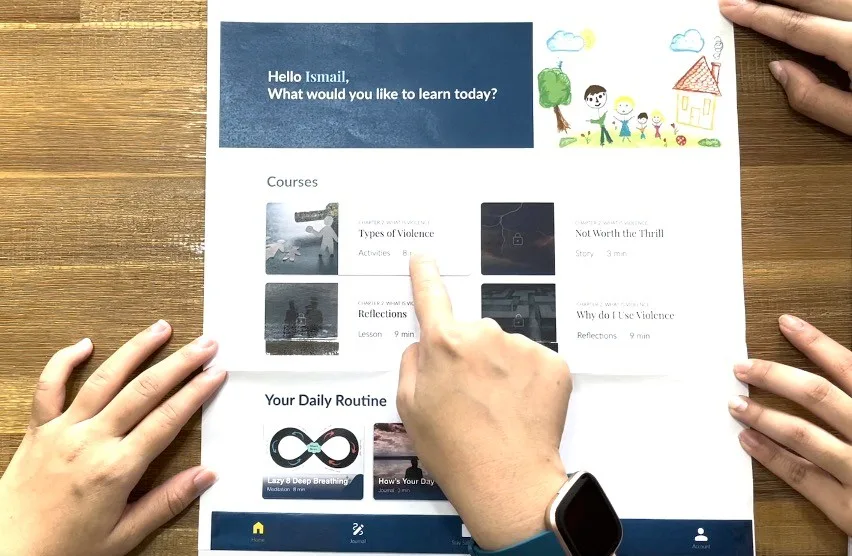
Re-enactment of Paper Prototype UT - Watch video here
Key Findings:
Tablet vs PDF Booklet
From both UT1 and UT2, 7 out of 10 users preferred the tablet over the booklet option. 3 users had no comments.
Users prefer using a tablet for several reasons, including: - feeling safer to write their reflections - having faster feedback on their answers in activities and reviews - the unavailability of writing materials in certain cells.
However, a drawback of the tablet edition is that users won't be able to bring their Stay Safe Plans and the package content with them upon release. To address this, we suggest enabling users to print a copy of their Stay Safe Plan along with their motivation banners when they are discharged from the prison.
Language Feature
From our UT2 findings - 5 out of 6 users will use the language function. - 3 out of 6 users liked the audio guide feature. - 2 out of 6 users liked the audio feature on each page.
Future Recommendation
1. Audio feature
From the results of our user testing, we found that: a. 3 / 6 users preferred the Autoplay Audio Guide b. 2 / 6 users preferred to activate audio on the individual page
More data is needed to determine which autoplay feature would be more useful for users. Nevertheless, the feedback points to the fact that the audio function is a very useful tool for users who are unable to read fluently in English.
2. Onboarding Process
Due to the limited time on our project, we were unable to find an appropriate solution for the onboarding process. This will be a very useful tool to explain to users the purpose of the program, how to utilise it and why it is relevant to them. Currently we have come up with some screens to explain to the users on how to utilise the digital solution and navigate through the application. Refer to the link below for an example of a first time user
Disclaimer:
To comply with my non-disclosure agreement, I have omitted confidential information in this project. The information in this project is edited and may not necessarily reflect the current state of the project.